When your CNC machine starts throwing alarms, running erratically, or refusing to power up, every minute of downtime cuts into output and profitability. The problem is that a Fanuc control failure rarely announces itself with a single, obvious symptom. Instead, it tends to creep in through intermittent glitches, sluggish cycle times, or alarm codes that seem to appear out of nowhere.
This guide breaks down the most common signs of Fanuc control failure, the root causes behind those symptoms, and how your maintenance team can diagnose problems before they escalate. We will also cover compatibility considerations and point you toward the Fanuc controls, technical resources, and replacement parts you need to get back up and running.
In This Article
- How a Fanuc Control Works (and Why It Fails)
- Recognize the Warning Signs of Fanuc Control Failure
- Common Causes of Fanuc Control Failure
- How To Diagnose Fanuc Control Failure
- Compatibility Considerations When Replacing Fanuc Control Components
- Prevent Fanuc Control Failure Before It Happens
- Get the Fanuc Control Parts and Technical Help You Need From T.I.E. Industrial
- Stockpile CNC Parts and Modules as Insurance Against Fanuc Control Breakdowns
- Frequently Asked Questions
- Related Articles
How a Fanuc Control Works (and Why It Fails)
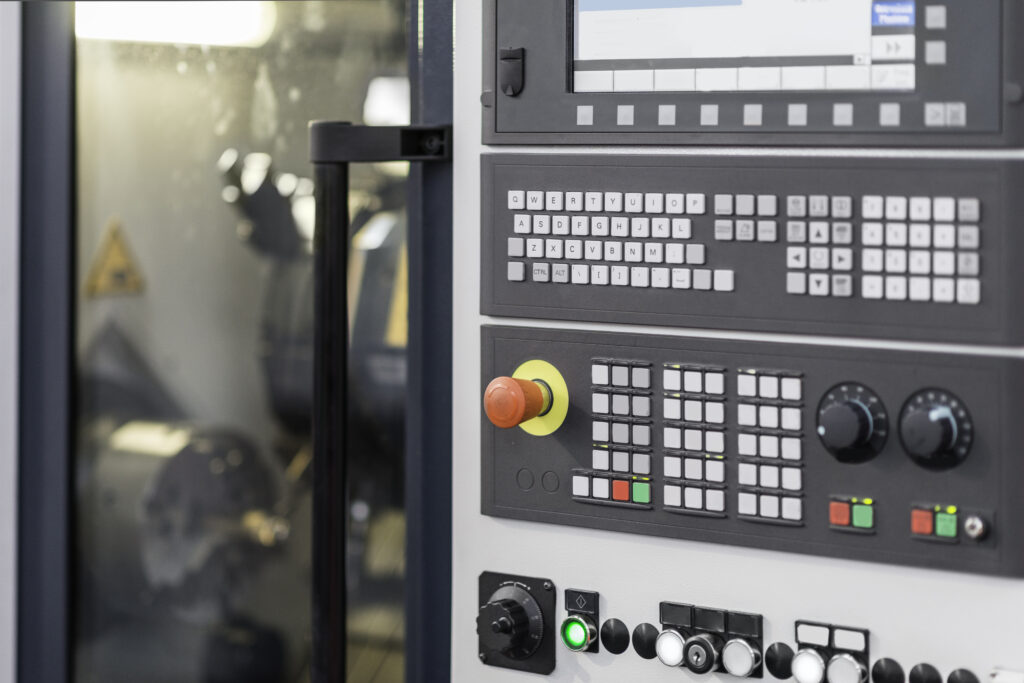
A Fanuc control is the central processing hub for your CNC machine. It receives input signals from sensors, operators, and programmed instructions, then routes those signals through internal circuit boards to servo drives, spindle amplifiers, I/O modules, and other connected devices. Every output your machine produces depends on the control’s ability to process inputs accurately and relay the correct commands.
When any link in that signal chain breaks down, the result is a control failure. That breakdown can occur internally due to a faulty CPU, degraded memory, or a damaged printed circuit board. It can also originate externally, from power supply irregularities, environmental hazards, or compromised cabling. Understanding where failures tend to start gives your team a significant advantage in minimizing downtime.
Recognize the Warning Signs of Fanuc Control Failure
Catching a failing Fanuc control early can mean the difference between a quick parts swap and a prolonged shutdown. Here are the symptoms your operators and technicians should watch for:
- Unexpected machine stops: The process the control manages halts mid-cycle without operator input. This is often the first indication of a serious internal fault, such as a failing power supply module or a corrupted program.
- Erratic or irregular machine behavior: Cycle times vary without explanation, axes drift from programmed positions, or the spindle speeds fluctuate. These inconsistencies often point to degraded circuit boards, loose connections, or intermittent communication errors between the control and its servo drives.
- Alarm codes on the display: Fanuc controls communicate problems through specific alarm codes. Servo alarms (like the 401 or 414), system alarms (in the 114 to 160 range for FSSB communication issues), and overtravel alarms each indicate a different failure point within the system.
- Display anomalies: A screen that flickers, dims, goes blank, or displays corrupted characters can signal a failing CRT/LCD unit, a power supply issue, or a problem with the main board itself.
- No power or partial power-up: If the control fails to boot, powers on but does not complete its startup sequence, or loses power intermittently, the issue likely sits in the power supply, fuses, or main control PCB.
- Data errors or program corruption: Good data goes into the machine, but the output contains errors. This often traces back to degraded memory, a failing backup battery, or corrupted SRAM that has lost stored parameters.
Even subtle changes in machine behavior can be early indicators of Fanuc control failure. Operators who notice unusual sounds, minor position deviations, or slower-than-normal response times should flag those observations for the maintenance team immediately.
Common Causes of Fanuc Control Failure
Most causes of Fanuc control failure fall into a few well-defined categories. Knowing what drives these failures helps your team take preventive action and troubleshoot more efficiently when problems arise.
Component Wear and Aging
Fanuc controls are built to industrial standards, and under ideal conditions, a unit can last 20 years or more. That said, internal components degrade over time. Capacitors dry out, solder joints weaken, and printed circuit board traces can develop micro-fractures from years of thermal cycling. A control that has been in service for 10 to 15 years is realistically approaching the end of its original component life, even if it has been well maintained.
Power Supply Problems
Power-related issues rank among the most frequent causes of Fanuc control failure. A CNC machine typically relies on multiple AC and DC power supplies for its internal subsystems, including separate supplies for the PCB, the monitor, I/O cards, and the door interlock circuit. Blown fuses, degraded capacitors inside the power supply, and voltage drops from the facility’s incoming power can all cause a control to behave unpredictably or shut down entirely. A 24V DC supply that drops below 20 volts, for example, will cause immediate performance problems.
Environmental Factors
The operating environment plays a significant role in the longevity of control systems. Excessive heat forces internal components to work harder and accelerates capacitor degradation. Moisture can corrode connectors, damage circuit board traces, and create short circuits. Metallic dust and coolant mist, both common in machine shops, can infiltrate the control enclosure and create conductive paths that lead to shorts or signal interference. Electromagnetic interference (EMI) from nearby equipment can also disrupt communication between the control and its connected devices.
Power Surges and Electrical Instability
Facilities prone to brownouts, blackouts, or voltage spikes put their Fanuc controls at particular risk. A power surge can corrupt stored parameters, erase SRAM data, or physically damage sensitive components on the main board. Even brief interruptions can cause the control to lose its reference position, triggering APC (Absolute Pulse Coder) alarms that require re-referencing before the machine can operate again.
Cable and Connector Degradation
Motor feedback cables, encoder cables, and FSSB (Fiber Optic Serial Servo Bus) connections are all critical to communication between the control and the machine’s servo system. Over time, cables can suffer from coolant contamination, vibration-induced fatigue, or damage from improper routing during maintenance. A single degraded cable can trigger communication errors, axis alarms, or intermittent positioning faults that mimic a control failure.
Software and Parameter Corruption
Fanuc controls rely on stored parameters, PMC (Programmable Machine Controller) data, and part programs to operate correctly. Battery failure in the control can erase SRAM data, wiping out years of custom parameter settings. Improper parameter changes during maintenance, incomplete firmware updates, or even rare cybersecurity incidents can corrupt the software that the control depends on to function.
How To Diagnose Fanuc Control Failure
When your Fanuc control shows signs of failure, a systematic approach to diagnosis will save time and prevent unnecessary parts replacement.
Start With the Alarm Codes
Fanuc controls display specific alarm codes that point toward the failing component or subsystem. Record the exact code, including any associated axis or amplifier identifiers. Servo alarms, spindle alarms, power alarms, and system alarms each follow their own numbering conventions, and the CNC diagnostics page (such as Diagnostic 200 for servo-related issues) can provide additional detail about what triggered the fault.
Check the Power Supply
Verify that the incoming facility power is stable and within specification. Then measure the output of each internal power supply using a multimeter. Look for voltage readings that fall outside the acceptable tolerance for each supply. Pay special attention to the backup battery voltage as well; a low battery is one of the most overlooked causes of parameter loss and SRAM-related alarms.
Inspect Cables and Connections
Visually inspect all cables running to and from the control, including servo motor feedback cables, encoder cables, and I/O connections. Look for signs of coolant contamination, abrasion, loose connectors, or damaged pins. Reseat any suspect connections and test for continuity where possible.
Evaluate Environmental Conditions
Check the temperature inside the control enclosure and verify that cooling fans are operational. Look for signs of moisture, dust accumulation, or oil mist infiltration. If the control’s environment has changed recently (new equipment nearby, a failed HVAC system, or a shop reconfiguration), that change could be contributing to the problem.
Consult Fanuc Documentation
Fanuc manuals provide detailed troubleshooting procedures for specific alarm codes, parameter settings, and hardware configurations. Connection manuals, maintenance manuals, and parameter manuals each cover different aspects of the control system and can guide your technician toward the correct diagnosis. If you need help identifying the right manual for your system, our team can point you in the right direction
Compatibility Considerations When Replacing Fanuc Control Components
Replacing a failed component in a Fanuc control requires careful attention to compatibility. Fanuc has produced multiple control series over the decades, from the System 5 and Series 10/11/12 through the Series 15, 16, 18, 21, 30i, and 0i families. Each series uses specific PCBs, power supplies, I/O modules, and firmware versions that may not interchange with other series.
Before ordering a replacement part, confirm the exact part number from the label on the failed component. Fanuc part numbers (typically starting with A02B, A16B, A20B, or A06B) identify the specific board revision and configuration. Installing the wrong revision can cause additional alarms or prevent the control from booting altogether.
If you are unsure about compatibility, find your local sales rep or call our tech team directly. Our specialists can verify the correct replacement for your specific control configuration.
Prevent Fanuc Control Failure Before It Happens
Proactive maintenance significantly reduces the risk of an unexpected Fanuc control failure. A few targeted practices can extend the life of your control and keep your machines running:
- Monitor and maintain backup batteries: Replace control batteries regularly before they reach the end of their rated life. A dead battery can wipe out stored parameters overnight.
- Keep the control enclosure clean: Regularly inspect and clean air filters, cooling fans, and ventilation paths. Remove accumulated dust, oil mist, and metallic debris before it reaches sensitive components.
- Stabilize your facility’s power: If your facility experiences frequent power fluctuations, invest in power conditioning equipment or an uninterruptible power supply (UPS) to protect the control from surges and sags.
- Back up parameters and PMC data regularly: Store backups on external media so your team can restore critical settings quickly after a battery failure or unexpected data loss.
- Inspect cables during scheduled downtime: Vibration, coolant exposure, and repeated flexing all take a toll on cables over time. Catching a frayed feedback cable before it fails can prevent a servo alarm that shuts down production.
- Keep critical spare parts on hand: Stocking backup I/O units, power supplies, and PCBs means your team can swap a failed component and restore production in hours instead of days.
Get the Fanuc Control Parts and Technical Help You Need From T.I.E. Industrial
When a Fanuc control failure puts your production at risk, you need the right parts, quick answers, and a team that understands Fanuc systems inside and outside the enclosure. T.I.E. Industrial stocks over 150,000 Fanuc controls and components, each rigorously tested under load and backed by a one-year in-service warranty. Find your local sales representative today, or call us at (615) 471-9465 to speak with a specialist who can help you diagnose the issue, confirm the right replacement part, and get it shipped the same day.
Stockpile CNC Parts and Modules as Insurance Against Fanuc Control Breakdowns
Frequently Asked Questions
How long does it typically take to diagnose a Fanuc control failure?
Diagnosis time varies depending on the fault’s complexity. A clear alarm code with a known cause, such as a blown fuse or a dead backup battery, can be identified in minutes. Intermittent faults caused by environmental factors or degraded cabling can take several hours to isolate, especially if the problem only appears under specific operating conditions. Having the correct Fanuc maintenance manual on hand and access to the CNC diagnostics page significantly speeds up the process.
Can a Fanuc control be repaired, or does it need to be replaced entirely?
In many cases, a Fanuc control failure traces back to a single replaceable component, such as a power supply module, a printed circuit board, or a backup battery. Full control replacement is rarely necessary. You can rely on our Fanuc control repair team to perform component-level diagnosis and replace individual ICs, capacitors, or connectors on a failed PCB. We also offer professionally refurbished control units and PCBs that have been tested under load, giving you a cost-effective alternative to buying new from the OEM.
What is the difference between a servo alarm and a system alarm on a Fanuc control?
Servo alarms indicate a problem in the communication or performance loop between the CNC control and the servo drives or motors. Common examples include the 401 and 414 alarms. System alarms, numbered in the 100 to 999 range, point to issues within the control itself, such as FSSB communication failures (alarms 114 through 160), memory faults, or CPU errors. Each alarm type requires a different diagnostic approach, and checking the CNC diagnostics page will narrow down the specific component involved.
Related Articles
Troubleshooting Fanuc CNC FAQs about Common Issues and Solutions
Get the answers you need to your Fanuc CNC system questions.
Demystifying Fanuc Part Numbers: A Guide for Maintenance Managers Using Fanuc CNC Machines
Discover how to read Fanuc CNC part numbers.
Maintenance Tips for Prolonging the Life of Your Fanuc Amps
Find useful tips for keeping your Fanuc amps running.
Was this helpful?
6 / 0